Self-service guide
Program your NFC sign yourself
Signs you order from us arrive programmed, tested and locked, so you can skip this page. If you have a blank sign, or you simply want to know what happens to the chip, this is the whole process. It takes about three minutes.
Before you start
- Install NFC Tools (free) from the App Store or Google Play. On iPhone it needs iOS 13 or later; on Android, NFC must be switched on in Settings.
- Have your Google review link ready. It looks like
https://g.page/r/…/review. Our guide on finding your review link shows where to copy it from. - Know where the chip is: on stands and cards it sits behind the "tap here" mark. That is where the top of your phone needs to touch.
Seven steps
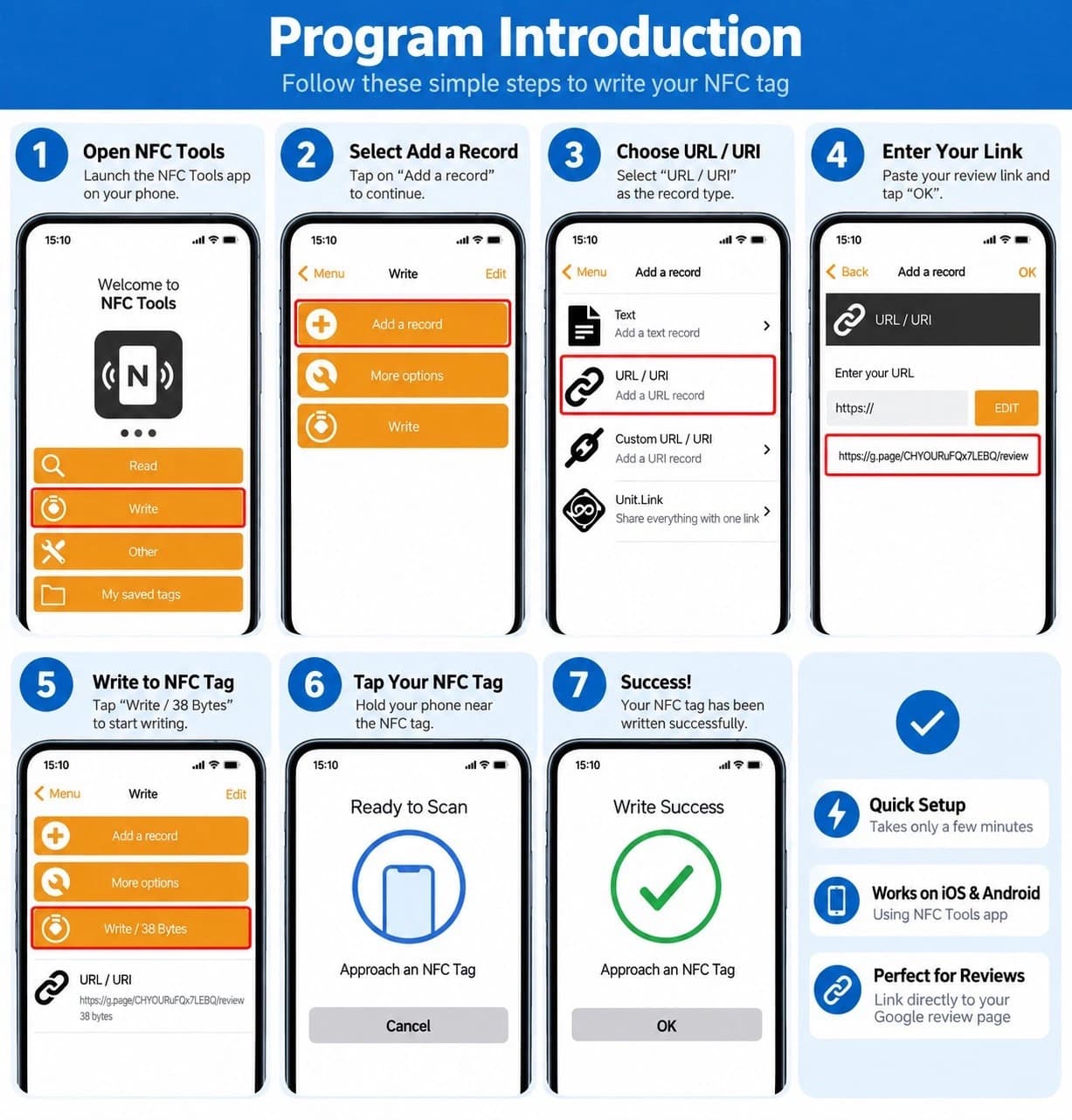
Open NFC Tools
Launch the app. On the home screen tap "Write".
Add a record
Tap "Add a record". A record is the one piece of data the chip will hold.
Choose URL / URI
Pick "URL / URI" from the list of record types. Not "Text" and not "Custom URL".
Paste your review link
Paste the full link into the field and tap "OK". Check it starts with https:// and ends with /review.
Tap "Write"
Back on the Write screen you will see your record listed with its size, for example "Write / 38 Bytes". Tap it.
Hold the phone on the sign
When the app says "Ready to scan", rest the top edge of your phone flat on the tap mark and keep it still for a second.
Done
The app shows "Write success". Pull the phone away and tap the sign again like a customer would: your review page should open.
If something goes wrong
- The phone does not react when I tap the sign
- Move the phone slowly over the sign. The antenna is at the top on iPhones and usually in the middle of the back on Android. Thick cases can block it, so try without the case.
- NFC Tools says the tag is read-only or locked
- That is a sign we programmed. Locked chips cannot be rewritten; contact us and we will sort it out.
- The link opens Google Maps but not the review form
- The URL is probably a Maps link rather than a review link. Go back to step 4 and paste the link that ends in /review.
- I want to lock the chip so nobody can change it
- In NFC Tools go to Other → Lock tag. It is permanent, so tap-test the sign first.
Stuck? Email [email protected] with a photo of the screen and we will help.
Rather not do it yourself?
Tell us your business at checkout and every sign arrives programmed, tested and locked.
Shop review signs